SOP — Canva Carousels from the brand's
master template
Hand Claude a brand's own Canva master file and a content plan. Get back an editable Canva design, built from that brand's real layouts, that a designer finishes in a short polish pass. One prompt does the work. Everything below explains what that prompt is doing, so you can trust it, steer it, and fix it when it goes sideways.
Before you start
You need five things. If any are missing, stop and build them first — the run will be bad otherwise, and it will be bad in a way that wastes a designer's afternoon.
| # | What | Why |
|---|---|---|
| 1 | A Canva master file with the brand's good post layouts as pages | The agent copies pages out of this. Any layout you want reused has to live here. |
| 2 | A Canva folder for the brand | Where the finished design gets filed. |
| 3 | A content plan — the actual copy, slide by slide | The agent writes nothing from thin air. No plan, no carousel. |
| 4 | Real photos, as local files or public URLs | A carousel with no photography looks cheap. See the photo gate in stage 3. |
| 5 | The Canva connector enabled in your session | Ask Claude "is the Canva MCP connected?" If it lists your Brand Kits, you are good. |
Getting a public URL for a repo file
Anything in the content system is already served publicly. Swap the host:
Why we work inside the master file
This is the whole idea, so it is worth thirty seconds.
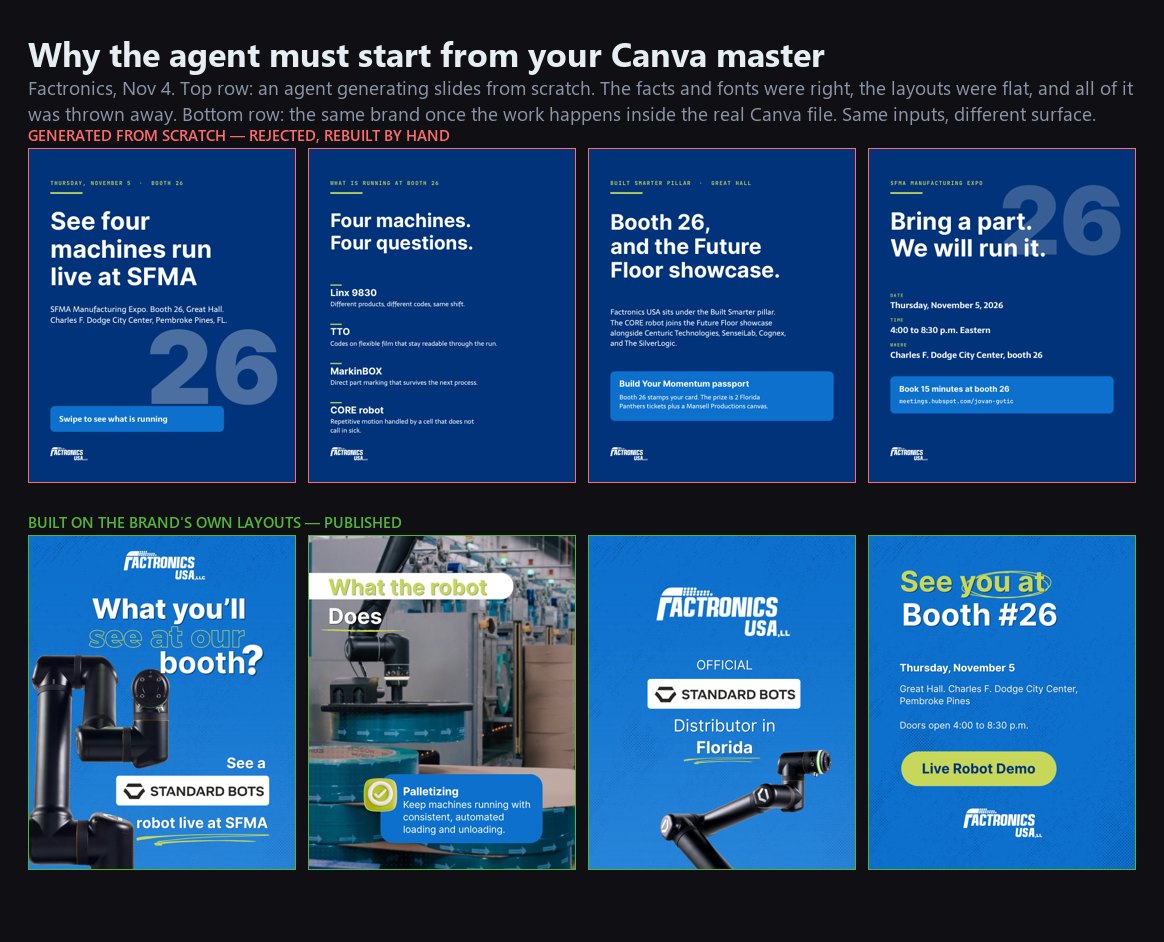
On Nov 4 an agent generated Factronics slides from scratch. The facts were right, the fonts were right, the layouts were flat — type on a blue ground, no photography. Pablo threw all of it away and rebuilt every post by hand.
The fix was not a better prompt. It was changing where the work happens. The agent now edits a copy of the brand's real Canva file, so it starts at the brand's quality bar instead of trying to reach it.
The prompt
Attach these two files from the Factronics design-agent folder so Claude knows the workflow, then send the prompt, swapping every <placeholder>.
The four lines that actually matter
duplica el archivo para no editar el masterbusca dentro de ese archivo los mejores layoutsusa las páginas 14 a 22 instead — it is faster and more predictable.What happens after you hit enter
Six stages. You appear in three of them.
3.1 · It reads the whole master
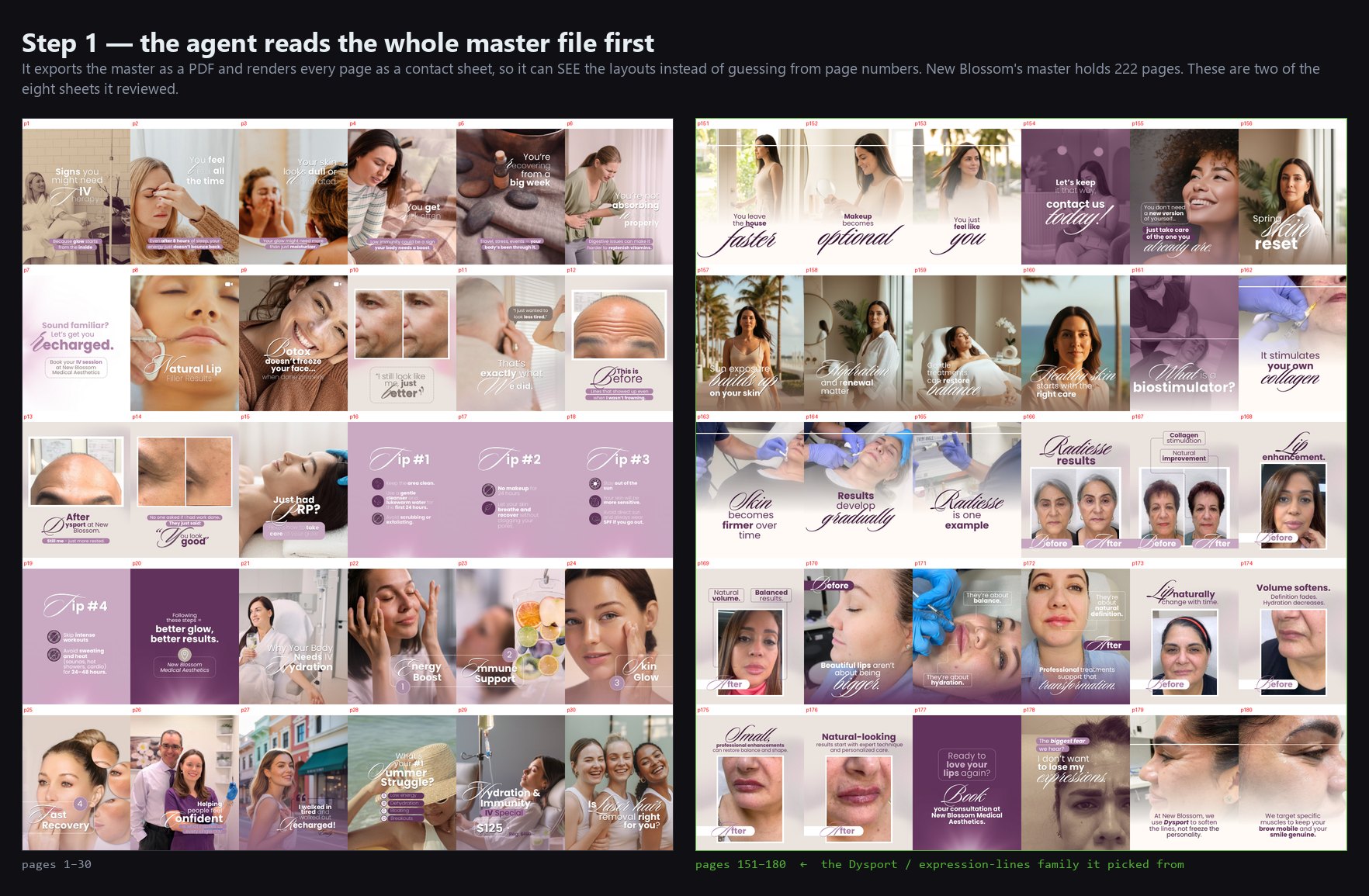
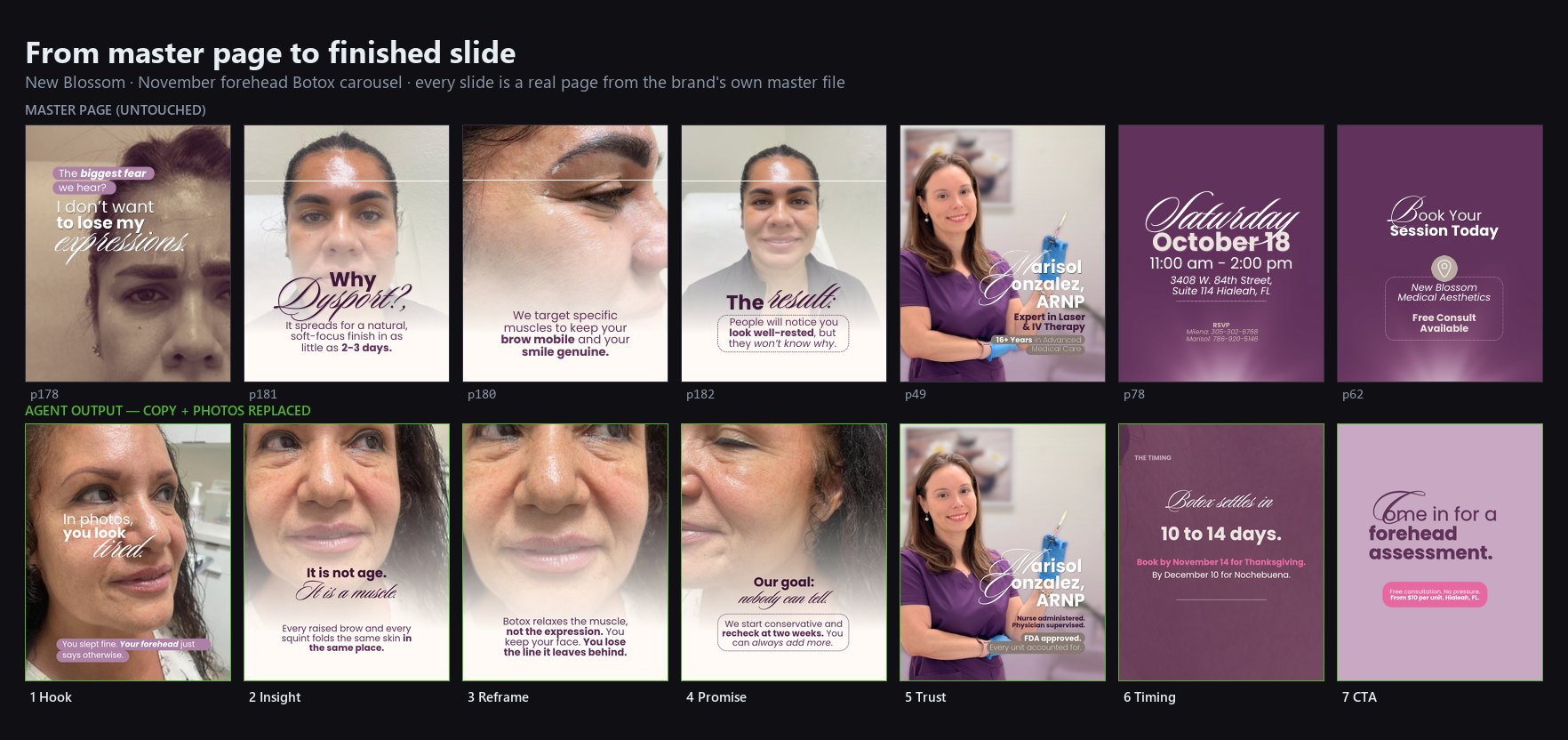
It exports the master as a PDF and renders every page into contact sheets so it can see the layouts rather than guess from page numbers. New Blossom's master is 222 pages; it reviewed all of them across eight sheets before choosing seven.
3.2 · It proposes a plan, then waits
You get a table: which master page becomes which slide, and why. This is approval gate 1. Read it properly. It is far cheaper to move a page number now than to re-cut a built slide later.
This is also where it raises conflicts. On New Blossom it flagged that the supplied photos were clinical close-ups of one patient in her fifties while the plan described a holiday party and a woman of 30 to 35, and asked how to handle it before building anything.
3.3 · It copies pages and loads photos
Pages are copied into a new design. Photos upload straight from your machine.
3.4 · It builds and checks its own work
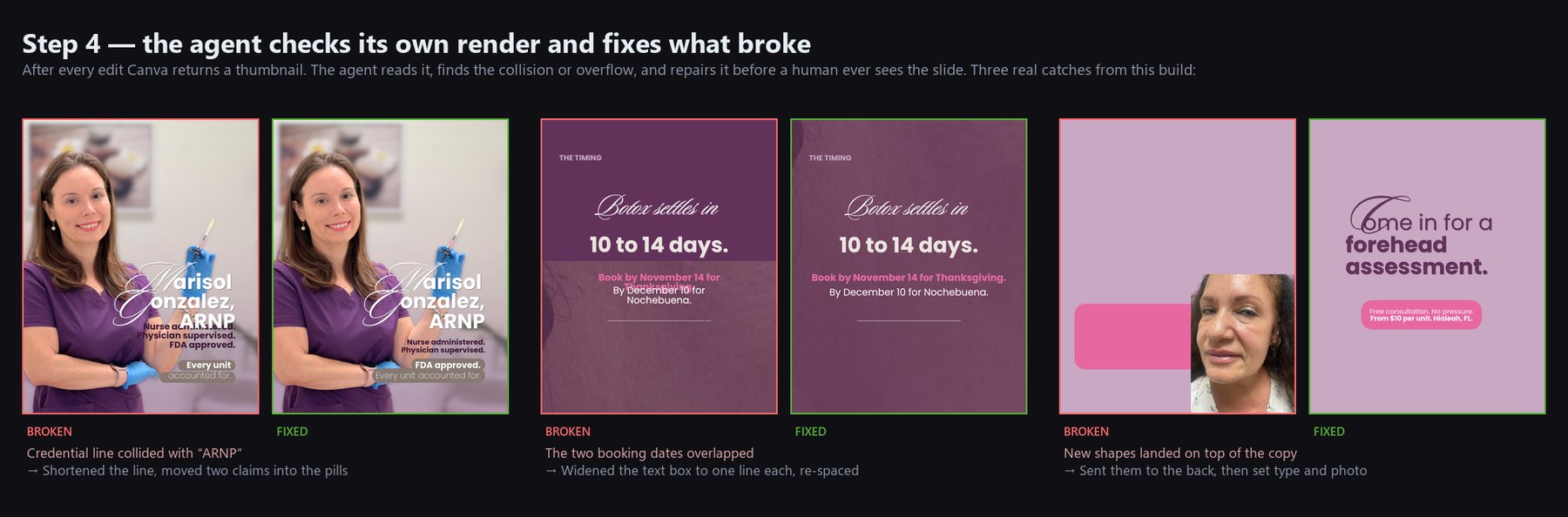
It rewrites copy inside the existing text boxes — that is what preserves the brand fonts — then places and scales the photos. After every edit Canva hands back a thumbnail, and the agent reads it, finds what broke, and repairs it before you ever see the slide. Minimum two passes.
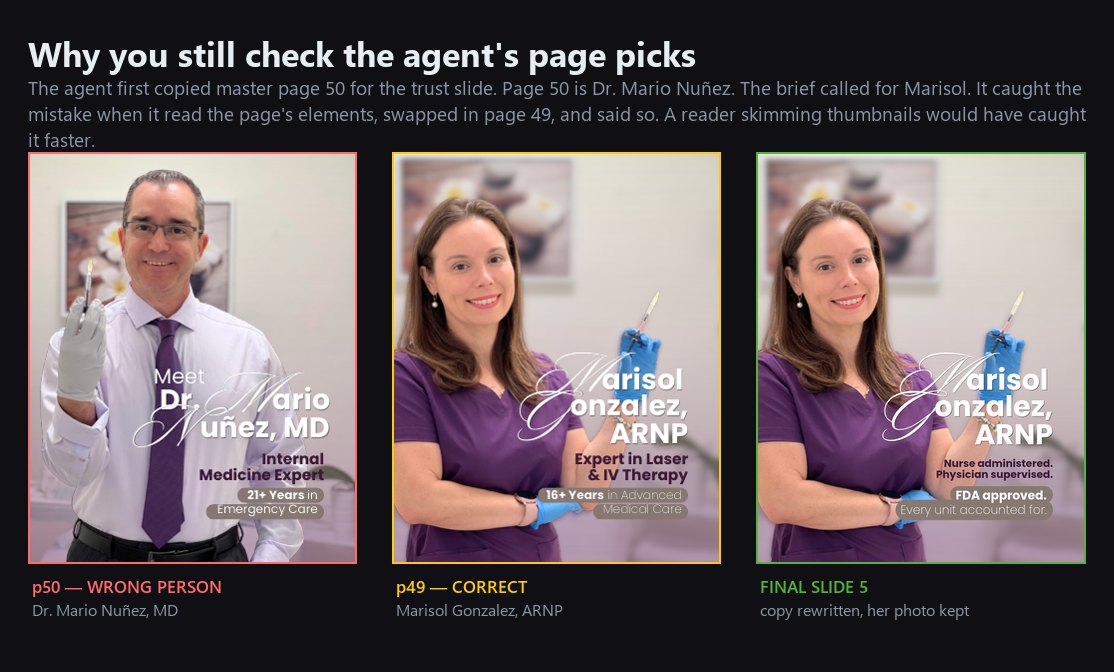
It also catches its own content mistakes here. It first copied master page 50 for the trust slide — that page is Dr. Mario Nuñez, and the brief called for Marisol. It caught it while reading the page elements, swapped in page 49, and said so in the handoff.
3.5 · Preview and save
Thumbnails first, then approval gate 2. Nothing is committed until you say save. Then it files the design in the brand's Canva folder as <Brand> - <Topic> - <Format>.
3.6 · The honest handoff
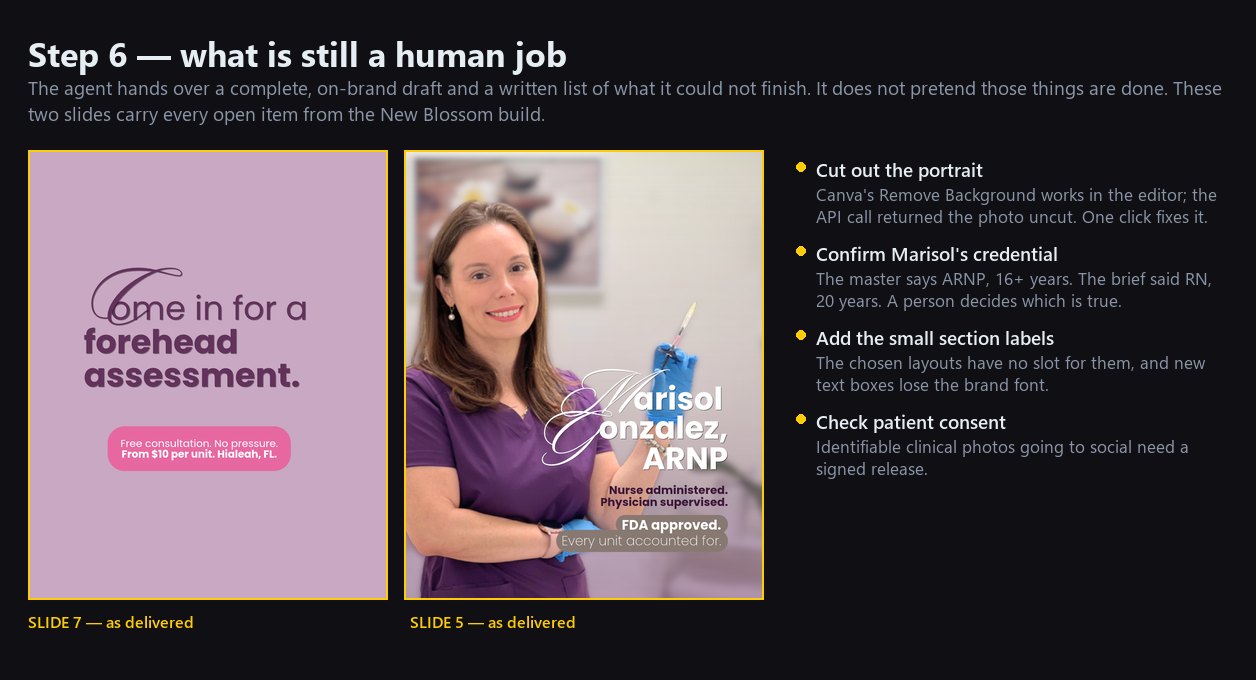
It gives you the editable link and a written list of what it could not finish. Read that list. It is the difference between a draft you can trust and one you have to re-verify.
Your three approvals
Nothing ships, saves, or goes public without a person saying yes.
The polish pass, and why it shrinks
Open the link, fix what is left, post it. Then tell Claude what you changed.
It diffs the two versions and writes each edit down as a rule. Next carousel starts from those rules, so the polish pass gets shorter every time. On Factronics that is a measured number:
| Carousel | Slides | Edited by hand |
|---|---|---|
| Linx 9830 | 4 | — (first run) |
| Linx IJ470 launch | 5 | 4 |
| SFMA live | 6 | 1 (cover only) |
The target is zero. Count your edits every time — it is the only honest measure of whether this is working.
Rules that already apply to every brand
Seed each new brand's design-rules.md with these. They came out of the Factronics polish passes.
- Photo is the hero: it fills at least half the frame and bleeds off an edge.
- No flat solid overlay on a photo. Use a gradient or halftone fade.
- Logo is a header anchor: top left, above the headline, readable on a phone.
- Partner logo chip on every product slide by default.
- CTA slide: two body lines maximum.
- Event photos: crop out other exhibitors' branding.
- Never use a wrong-model photo. If the master shows an old product, always replace the image.
- Never ship a type-only card because a photo is missing. Ask.
- Every claim traces to a source.
Known limits
Things the connector still does not do well. None are blockers if you know about them.
| Limit | What to do |
|---|---|
| Text added as a new element uses a default font | The agent reuses existing text boxes. This is also why small labels sometimes get dropped — if you need them, add them by hand. |
remove-background can return the image uncut | Do it in the Canva editor: select image → Edit image → Remove background. |
| Page merges take one operation per call | Expect a few approval clicks on bigger builds. |
| Copying the same page twice in one call fails | It duplicates the page afterwards instead. |
| An outdated logo in the master | Fix the master once. Every future copy inherits the fix. |
Checklist for a new brand
- Canva folder exists for the brand
- Master file exists, with the current logo and the layouts you want reused
- Content plan written, with the real copy slide by slide
- Photos ready — local folder or docs.916.coordenadas.co URLs
- Canva connector confirmed live in the session
- Playbook files attached to the prompt
- Plan approved before the build starts
- Thumbnails reviewed before the save
- Handoff list read, open items assigned to a person
- Edits reported back,
design-rules.mdupdated - Number of hand-edited slides written down
Worked example · New Blossom
The agent picked the master's Dysport / expression-lines family (pages 178–182) because it was the only layout set in that file built on real unretouched clinical photography — which is what the supplied photos were. That kind of reasoning is what the plan gate is for: it showed its choice and said why, before building.